4Real — how it works
4Real watches the ride offers Uber and Lyft send you, checks each one against your own filters in about a second, and shows you the answer. If you want, it can also accept good ride offers for you.
Everything marked PRO is part of the Pro plan (data that costs money to provide). Everything else works on every plan.
1 · Get started: sign up, token, install
About 10 minutes, once. You need your Android phone and your mobile number.
Download 4Real for Android- Sign up on driver.house. On your phone open driver.house/landingref001, enter your mobile number and type the code you get by text. Already signed up? Just sign in.
- Get your token. On driver.house open your Profile → Offer Filters → Install, then tap Generate Token. Tap the token box to copy it. (Or tap SMS Token to text it to yourself.)
- Install 4Real. Tap the green button above. Open the downloaded file, allow installs from your browser when Android asks, then tap Install.
- Paste the token in 4Real. Open 4Real Scan → Setup → Sign-in token. Paste, then tap Save token. The line Signed in to driver.house gets a ✓.
- Finish the checklist in Setup: every line needs a ✓ (section 13).
- Set your minimum $/hr in ALL FILTERS. 4Real accepts nothing until you do.
Learn more — the token
- The token is how 4Real knows it is you. It is valid for one year; driver.house shows the date it expires.
- Paste it exactly as copied. The word "Bearer" in front is fine.
- Keep it private: anyone with your token can use 4Real as you. Never post it or send it to anyone.
- New phone: open the same page on driver.house, copy your token again and paste it in the new phone.
- iPhone: the same page has the iPhone shortcut instead of this app.
Learn more — "Install blocked" or "App not installed"
- "For your security, your phone is not allowed to install unknown apps": tap Settings, turn on Allow from this source for your browser, go back, tap Install.
- "App not installed" over an older 4Real: your old copy came from somewhere else. Uninstall it first, then install this one. Your filters are kept on driver.house.
- Updates: download again from this page and install over it. Nothing is lost.
2 · The short version
- Set your minimum $/hr and your other filters once (ALL FILTERS).
- Drive with Uber and/or Lyft open as usual. 4Real works on top of them.
- Every ride offer gets a banner: green = it meets your filters, red = it doesn't (the reason is written), amber = something could not be checked, you decide.
- Tap the round 4Real button for the menu.
- When you trust it, turn Accept on and 4Real accepts green ride offers for you.
Learn more
4Real never accepts a ride offer that fails your filters. Only your own minimum decides the pay — 4Real does not invent a price for you. Your filters are saved on driver.house, so they are the same on every phone you sign in with.
3 · The 4Real button

| Tap | What it does |
|---|---|
| 1 tap | Opens the menu |
| 2 quick taps | Checks the ride offer on screen right now (when 4Real missed it) |
| 3 quick taps | Kill switch: 4Real stops tapping and switching apps. 3 taps again to turn it back on. |
| 4 quick taps | Exclude the pickup or drop-off place of the ride offer on screen |
Learn more
- Quick taps = less than half a second apart.
- A ⚠ on the button means there is a warning to read in Messages. ✋ means the kill switch is on.
- The kill switch shows a banner "KILL SWITCH ON" so you always know.
4 · The banner on a ride offer
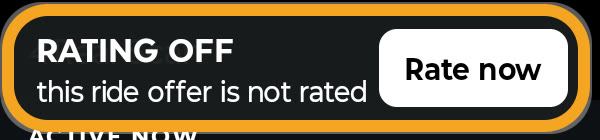
When a ride offer appears, 4Real shows a banner at the top: first a quick look from your phone, then the final verdict a moment later.
Example — quick look (still checking)
Example — final verdict, meets your filters (green)
Example — final verdict, a filter said no (red)
Example — could not be checked, you decide (amber)
Learn more
- Spinner = still checking. Closed ring = final verdict.
- U / L = Uber or Lyft.
- Big number = pay per hour for the whole job (pickup + ride). net = after gas and your running cost.
- Score /10 = how good this ride offer is compared with others; your filters decide yes or no, not the score.
- Amber CHECK: a filter you turned on could not run (for example the address was not found, or the flood list was unavailable). Auto accept never accepts it — you decide.
- The banner stays at least 3 seconds (7 at most). Tap it to close it; press and hold to open the ride's details.
- A line "Flooding on route: …" means a reported flood is on this ride's route. On Warn it is information only — Auto accept can still accept the ride.
5 · The menu, top to bottom
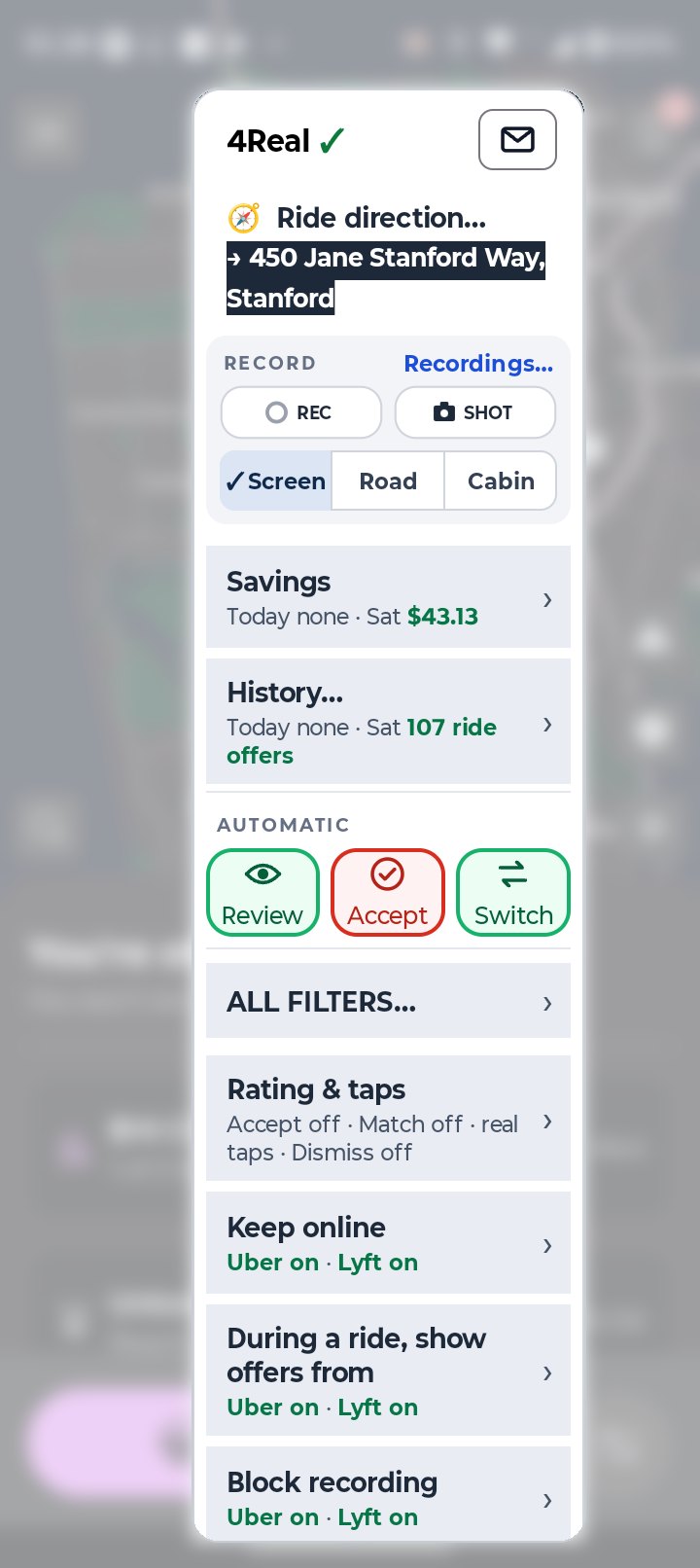
| 4Real ✓ | ✓ = everything is set up. If something is missing, a "Setup… · N to go" line shows here instead. |
| ✉ envelope | Messages: weather alerts, warnings, notes. A number = unread. |
| Ride direction… | Which way you want your drop-offs to go (N, E, S, W), or a place to get closer to — shown on the line under it. |
| RECORD | REC records, SHOT takes a screenshot; choose Screen, Road or Cabin. Recordings… lists them. |
| Savings | The money 4Real saved you today by turning down ride offers for money. The line under it: today, then the last day you drove. Tap to open (below). |
| History… | Every ride offer 4Real checked, newest first. The line under it: today’s ride offers and rides, or the last day’s. During a ride, the current ride shows just above it. |
| AUTOMATIC | Review = check ride offers. Accept = accept green ones for you. Switch = move between Uber and Lyft for you. Green = on, red = off, orange = practice. |
| ALL FILTERS… | All your filters on one screen. |
| Sections | Rating & taps, Keep online, During a ride, Block recording — tap one to open it (below). |
| Vendor sound lock | Keeps Uber and Lyft quiet; your music and other apps keep their volume. |
| 4Real settings… | The setup checklist. |
| Help… | The last line: opens this page. |
Learn more — Accept: REAL TAPS, PRACTICE, OFF
- REAL TAPS (green): 4Real accepts green ride offers for you.
- PRACTICE (orange): 4Real shows what it would accept and taps nothing. Use it to build trust. In History these show as PRACTICE, never as accepted.
- OFF (red): 4Real only shows banners.
6 · The menu sections
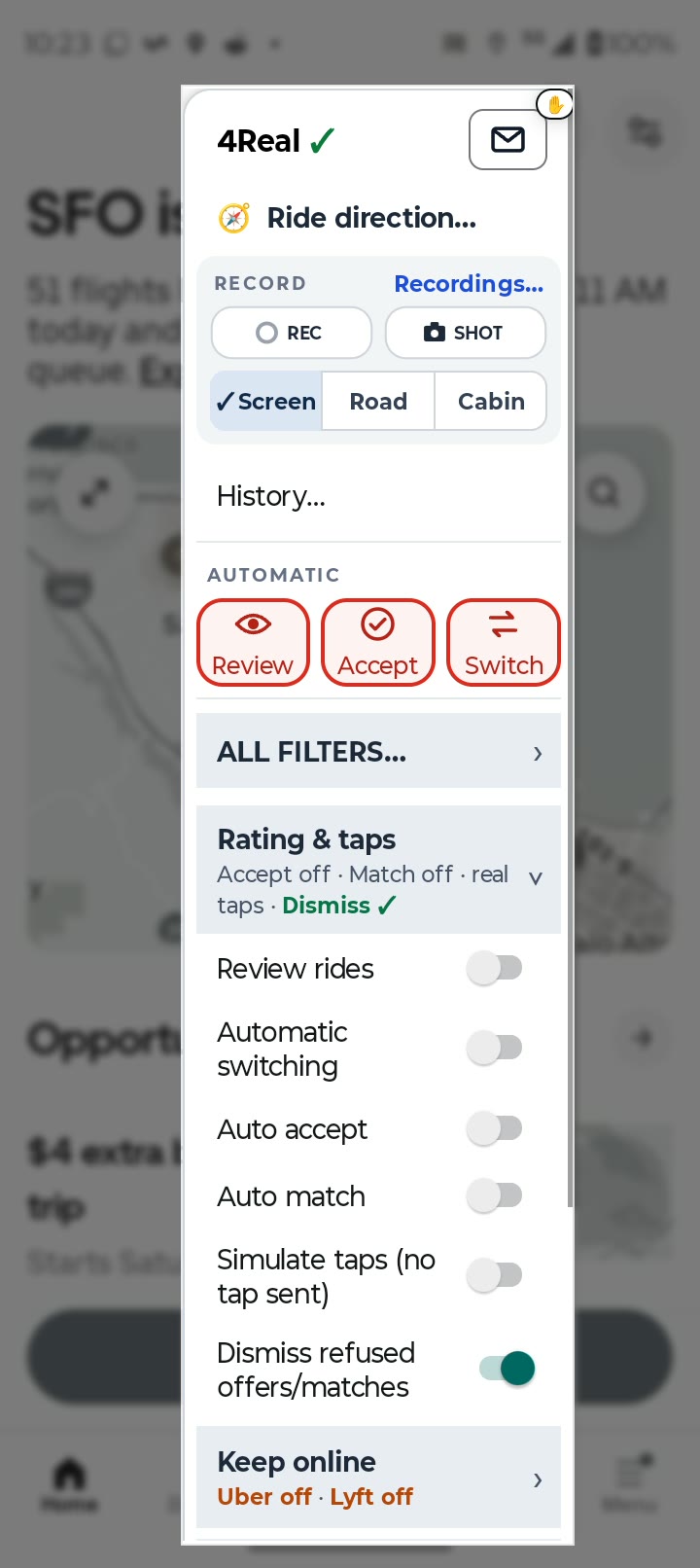
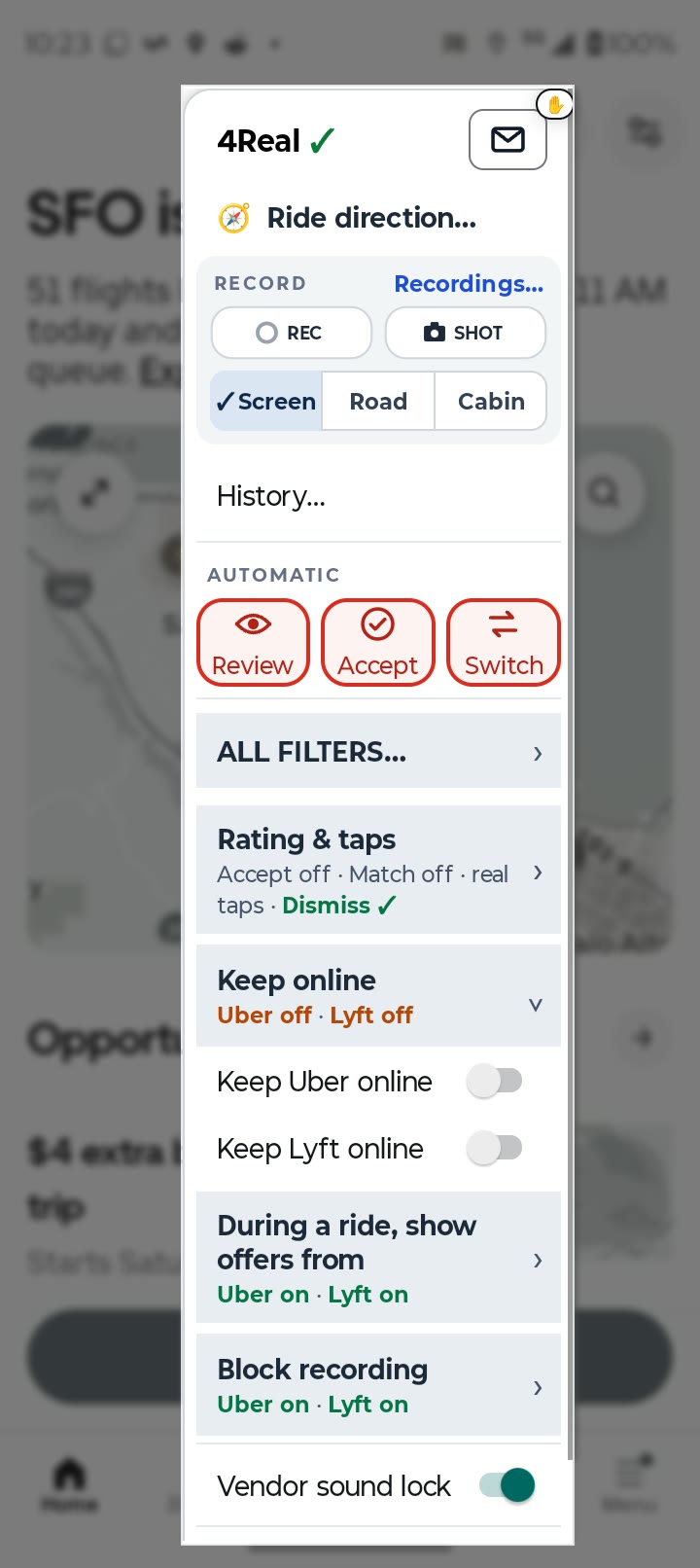
Each section opens with one tap on its title; the line under the title tells you what is on without opening it.
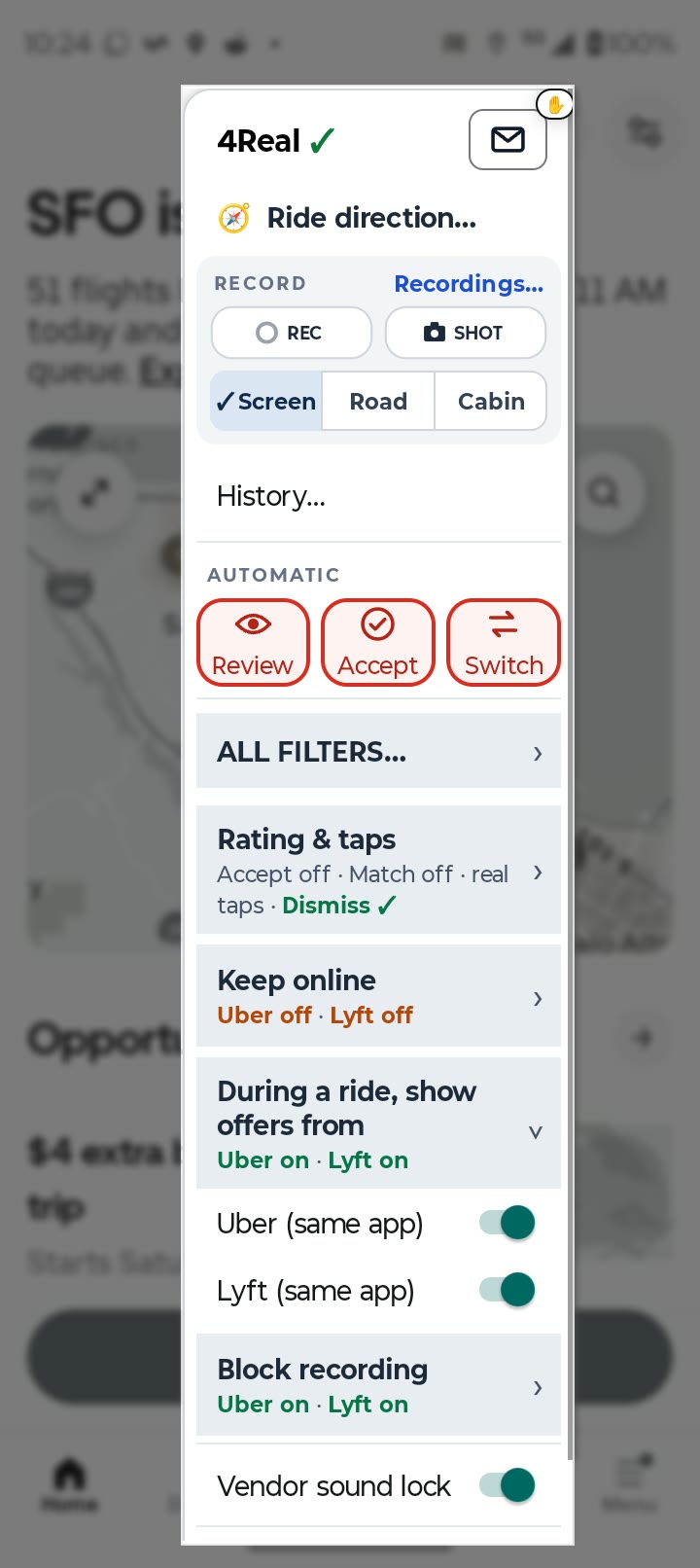
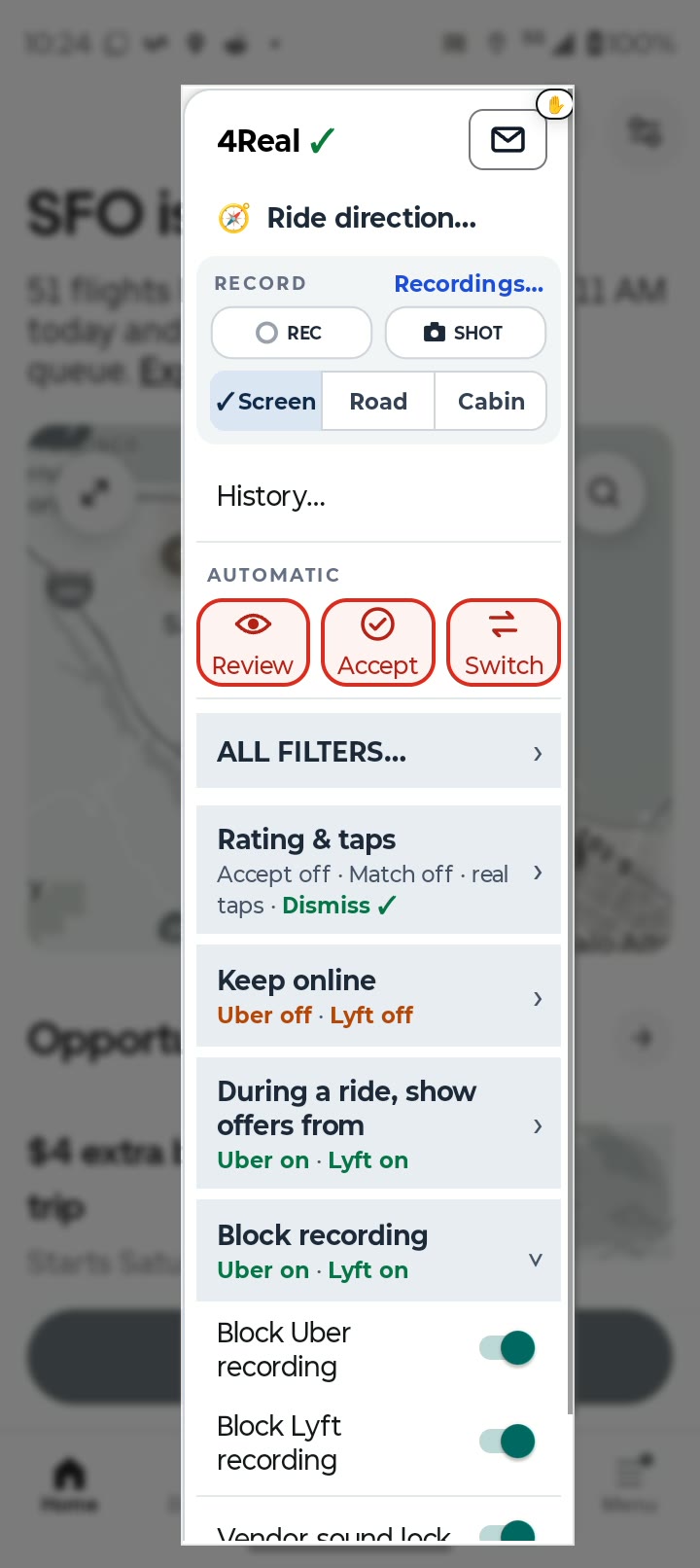
Rating & taps
- Review rides — check every ride offer and show the banner.
- Automatic switching — open the app a ride offer comes from (Uber ↔ Lyft).
- Auto accept / Auto match — accept green ride offers / tap Match on Uber's Match offers.
- Simulate taps — practice: show what it would tap, tap nothing.
- Dismiss refused offers/matches — close red ride offers for you.
Keep online
If Uber or Lyft goes offline by itself, 4Real puts it back online.
During a ride, show offers from
Uber and Lyft send the next ride offer before you drop off. On = 4Real checks it too (and Accept applies). Off = it is hidden from 4Real during your ride.
Block recording
Stops Uber / Lyft from using your camera and microphone.
Learn more
- Auto accept, Automatic switching and Keep online need System taps (see Setup). Banners do not.
- Your hands always win: when you touch the screen, 4Real waits 20 seconds before tapping anything.
- 4Real never switches apps while you are driving a ride, and never takes you off your navigation.
7 · ALL FILTERS
Your rules. Every change is saved on driver.house at once and used for the very next ride offer.
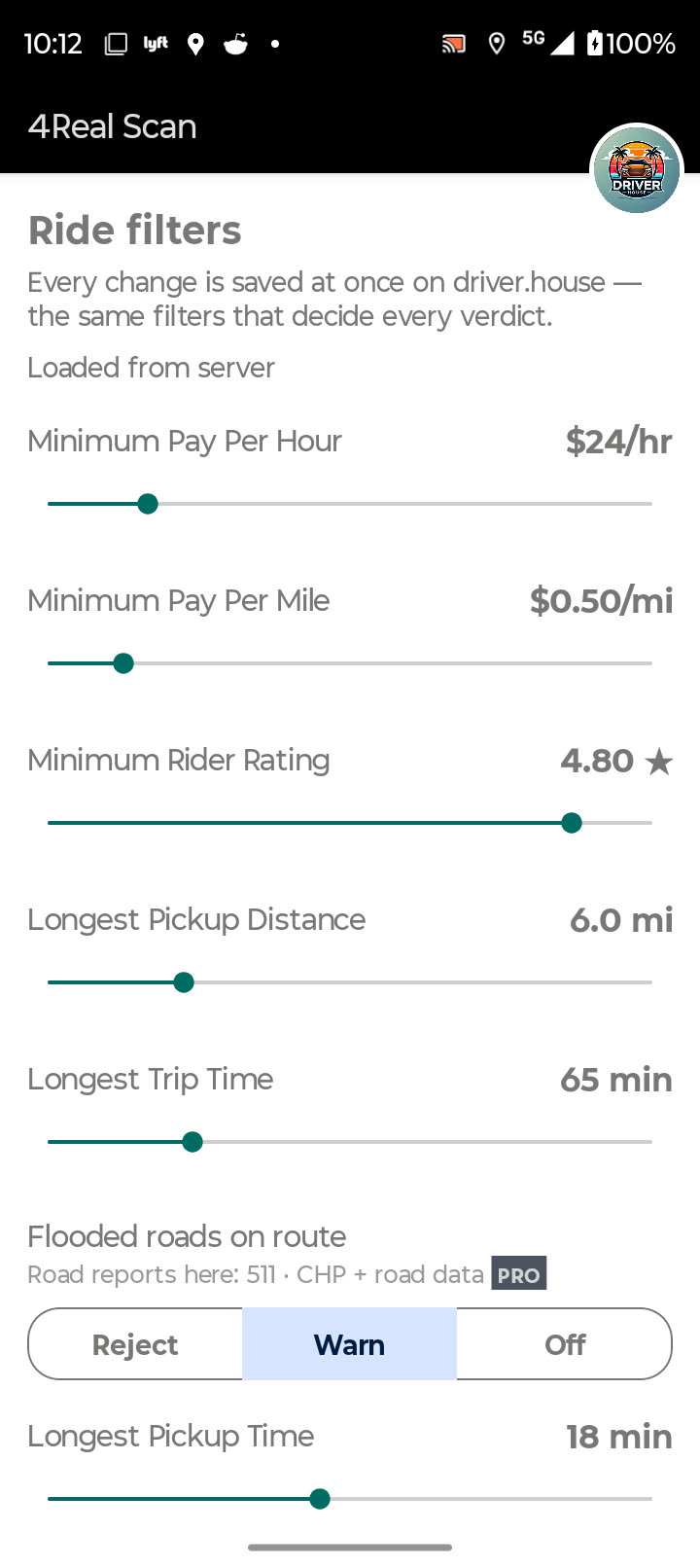
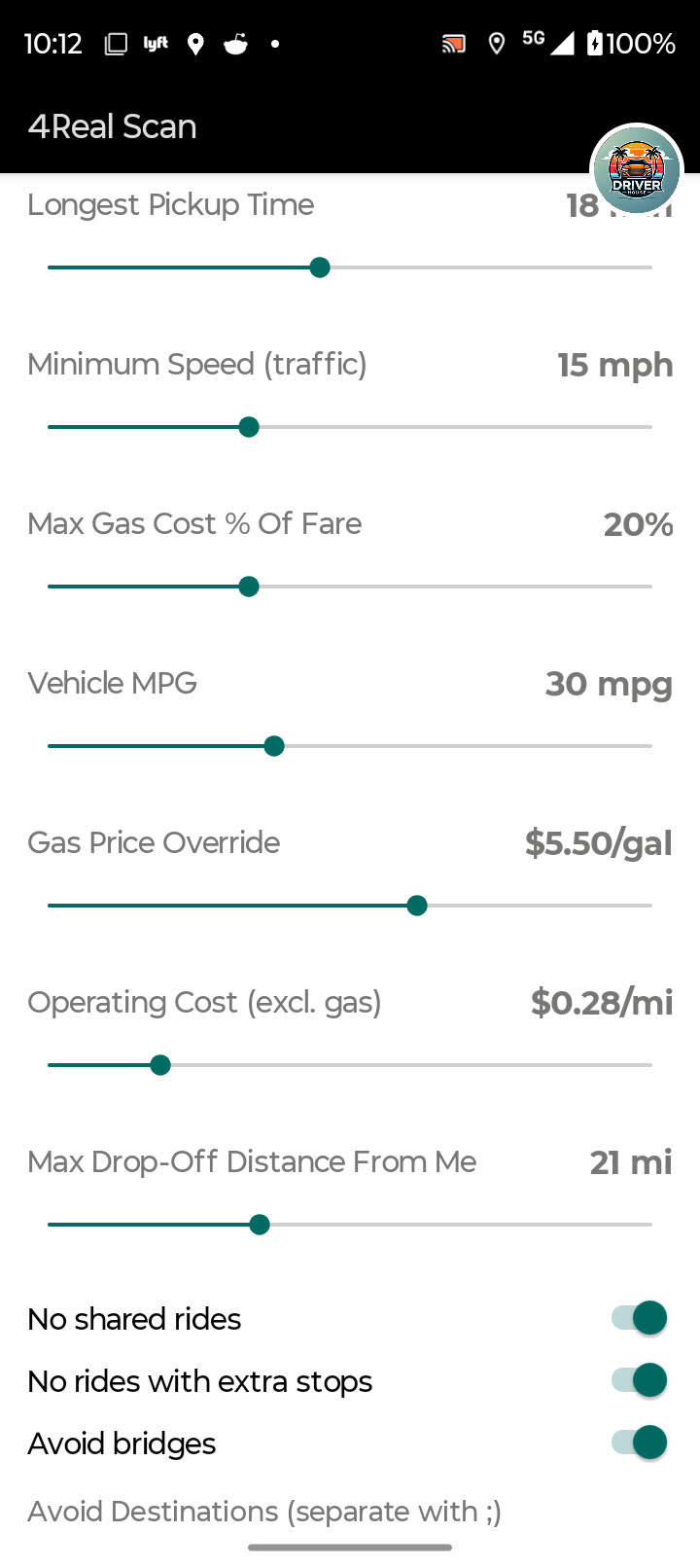
| Filter | A ride offer is refused when… |
|---|---|
| Minimum Pay Per Hour | it pays less per hour than this (pickup + ride counted) |
| Minimum Pay Per Mile | it pays less per mile than this |
| Minimum Rider Rating | the rider's rating is lower |
| Longest Pickup Distance / Time | the pickup is farther or longer than this |
| Longest Trip Time | the ride is longer than this |
| Flooded roads on route | (on Reject) a reported flood is on the ride's route — see below |
| Minimum Speed (traffic) | the ride is so slow in traffic that your time is wasted — unless it still pays your minimum $/hr |
| Max Gas Cost % Of Fare | gas would eat more than this share of the fare (uses your MPG and gas price) |
| Operating Cost | used for the net number (car wear, insurance…), per mile |
| Max Drop-Off Distance From Me | the drop-off is farther from where you are now |
| No shared rides / extra stops | it is a shared ride / has extra stops |
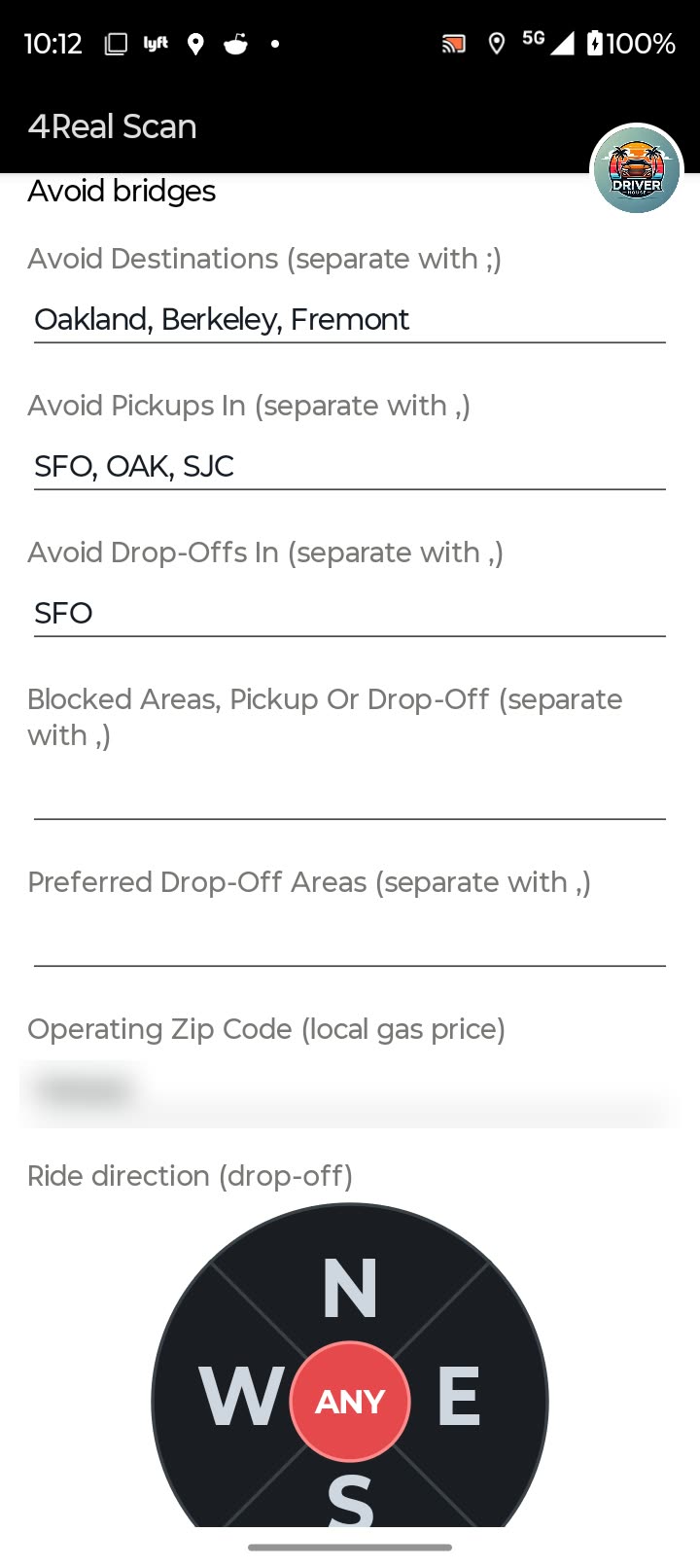
| Avoid bridges | the route crosses a bridge |
| Avoid Destinations / Pickups / Drop-Offs, Blocked Areas | the place is on your list (airport codes like SFO work) |
| Preferred Drop-Off Areas | the drop-off is not in one of these (leave empty to allow all) |
| Ride direction | the drop-off is not in a direction you picked |
Flooded roads on route
- Reject — a ride whose route has a reported flood is refused (red). Auto accept never accepts it.
- Warn — the banner names the flood, but the ride is judged on your other filters: with Auto accept on, it can still be accepted. Use Reject in a storm.
- Off — floods are not checked.
Standard and Pro both check floods on the ride's route. What differs:
| Standard | Pro PRO | |
|---|---|---|
| Where | Bay Area only (the 9 counties of 511 SF Bay — not the rest of California) | Anywhere in the US, Bay Area included |
| Flood reports | Official 511 · CHP: numbered highways and freeways only | 511 · CHP plus road data: city streets and ramps too |
| Finding the pickup and drop-off | Airports and places 4Real already knows. A new address may not be found: then, if a flood is reported near you, Reject shows amber CHECK and you decide | Every address looked up precisely |
| Route checked | One route | When a flood is near: a second route too (the way traffic would send you). A flood on either one counts |
| Outside the Bay Area | Not checked — the row is grey | Checked |
The line under the title says what works where you are. Grey = it cannot work there (no reports, no location, or not in your plan); your choice is kept.
Learn more — how a flood is matched, and its limits
- A flood counts when it is on the ride's own route (pickup → drop-off), on the same road and the same direction. A flood on the other side of the freeway or on a street you only cross does not count.
- Your drive to the pickup is not checked. Look at the pickup area yourself.
- Official reports only: a flood you see on a map app may not be reported yet.
- On Reject, if a flood is reported near the ride but its route cannot be worked out, or the flood list is unavailable, the banner turns amber ("CHECK: Floods not checked…") and Auto accept does not accept it. You decide.
8 · History
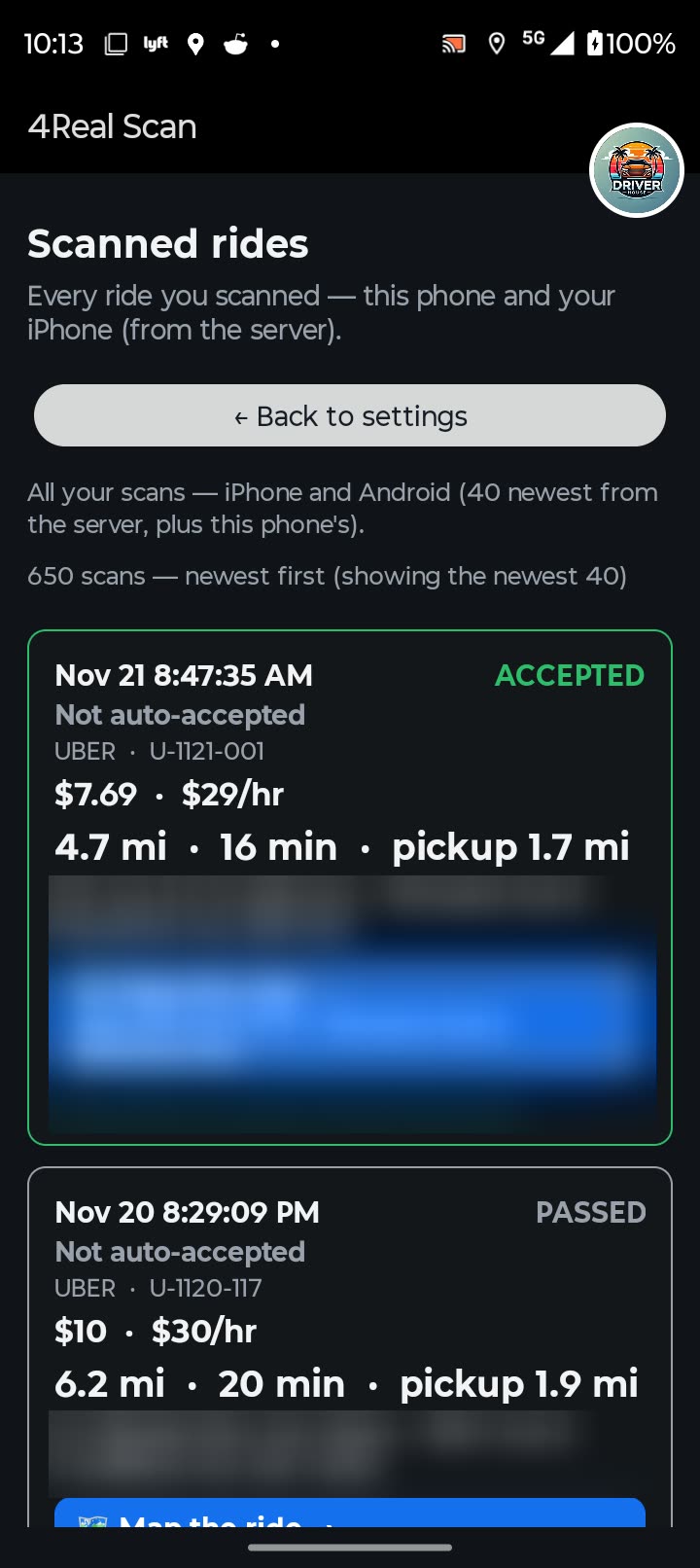
Every ride offer 4Real checked, with its verdict, pay and route. Map the ride opens your map with the pickup as a stop on the way to the drop-off.
| ACCEPTED | you got this ride |
| PASSED | green, but not taken |
| REJECTED | a filter said no (reason shown) |
| CHECK | something could not be checked |
| PRACTICE | practice mode: 4Real would have accepted it |
| CANCELLED | the ride was cancelled |
Learn more
The list shows rides from this phone and from your other devices signed in to driver.house. Tap a ride for its details.
9 · Savings
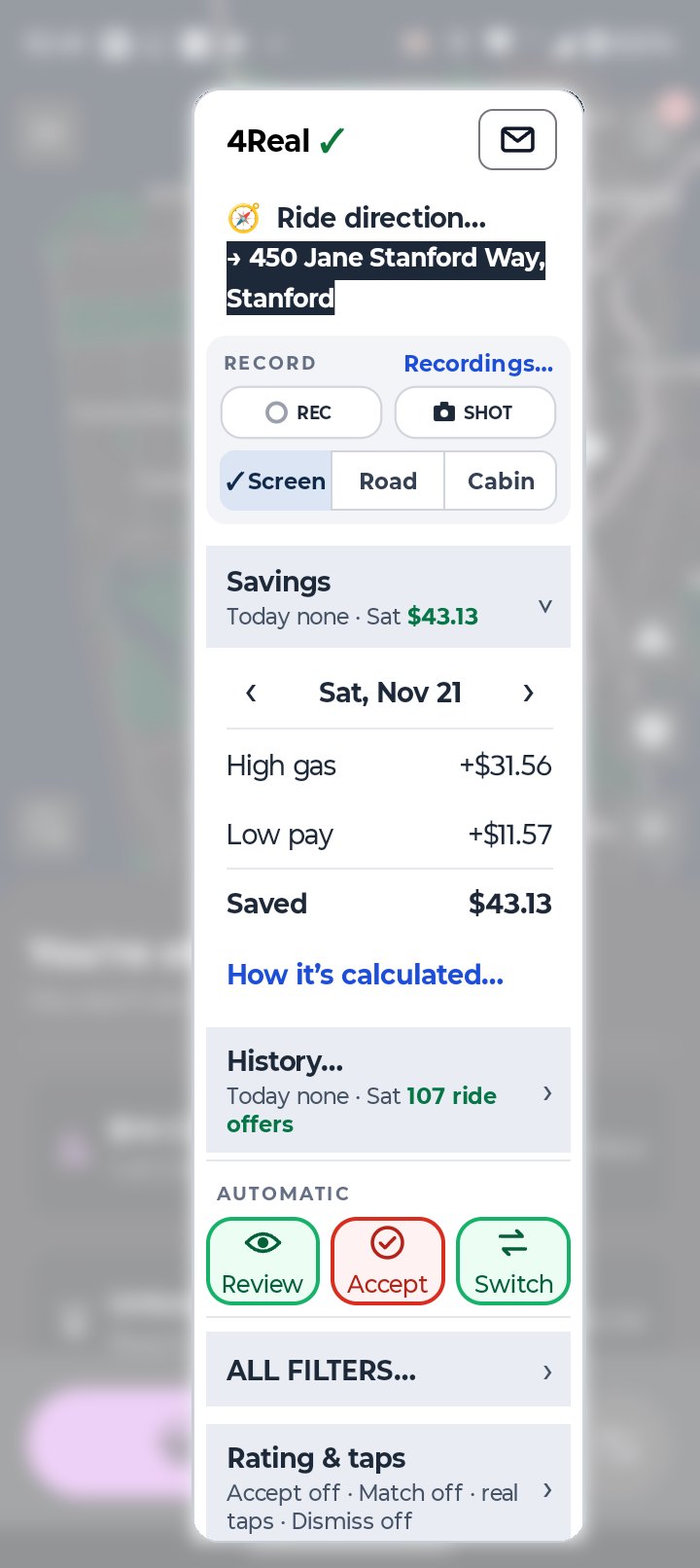
How much money 4Real saved you by turning down ride offers that would have paid less than the rides you actually drove.
| Line under Savings | Today’s amount, or “Today none” and the last day you drove. |
| ‹ day › | Swipe right (or tap ‹) for the day before, left (or tap ›) for the next day. Today with no ride yet says No data. |
| High gas | Ride offers turned down because gas would eat too much of the pay. |
| Low pay | Ride offers turned down because they paid less than your minimum per hour. |
| Saved | The total for that day. |
| How it’s calculated… | Opens a page with that day’s numbers in plain words, one example, and every ride offer turned down, one by one. |
Learn more — how the amount is worked out
- Your rate that day: what your rides paid minus gas, divided by the time they took (pickup + ride). Example: 12 rides paid $114.56, gas $17.34 → $97.22 in 3 h 44 min = $26.04 an hour after gas.
- Each ride offer turned down for money is worked out the same way. If it comes to less per hour than your rate, turning it down saved you the difference for its time. Example: $21.90 for 45 min with $5.72 of gas = $21.57 an hour → you saved $3.35.
- A turned-down ride that would have paid better than your rides counts against the total.
- Ride offers turned down for your direction, an area or city you avoid, or a bridge are your choice, not money — they are not counted.
- Pay is what the ride offer showed; tips are not in it. Cancelled rides are not rides you drove.
10 · Messages
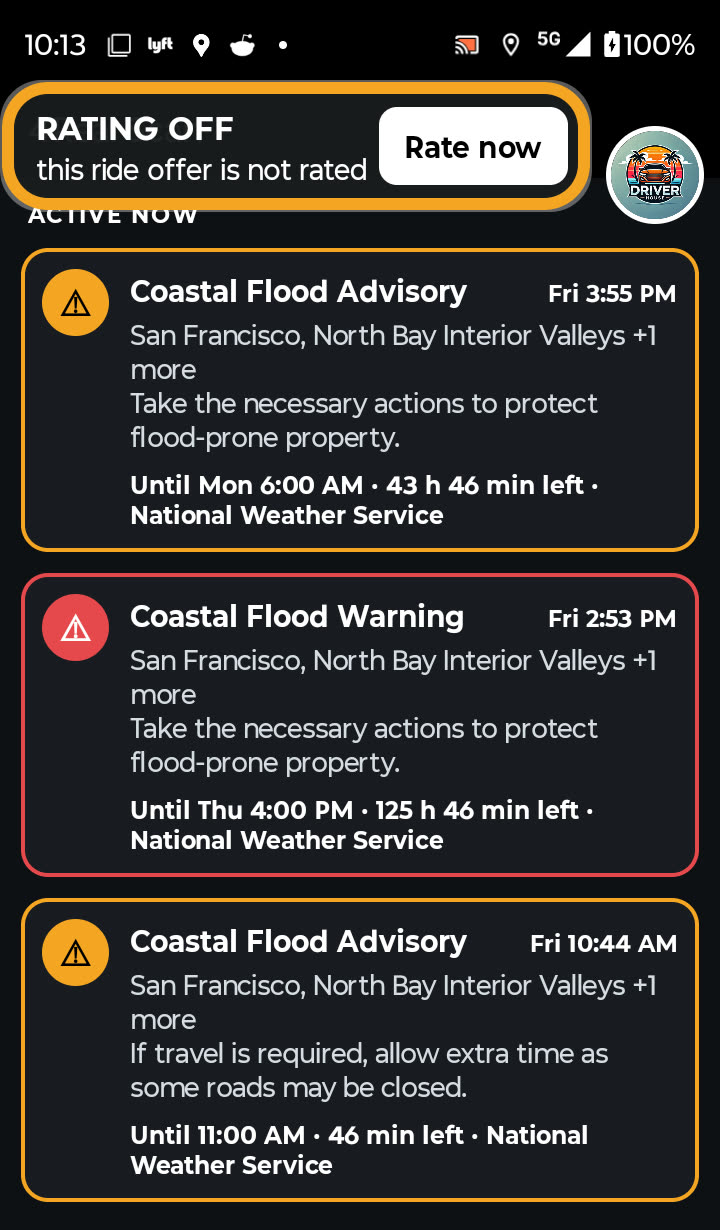
Weather alerts (National Weather Service, US), surge notes and 4Real warnings — kept here so you can read them after the banner is gone.
11 · Ride direction
Get ride offers that take you where you want to go — toward home, or toward the busy area. Two ways: a compass direction, or a place.
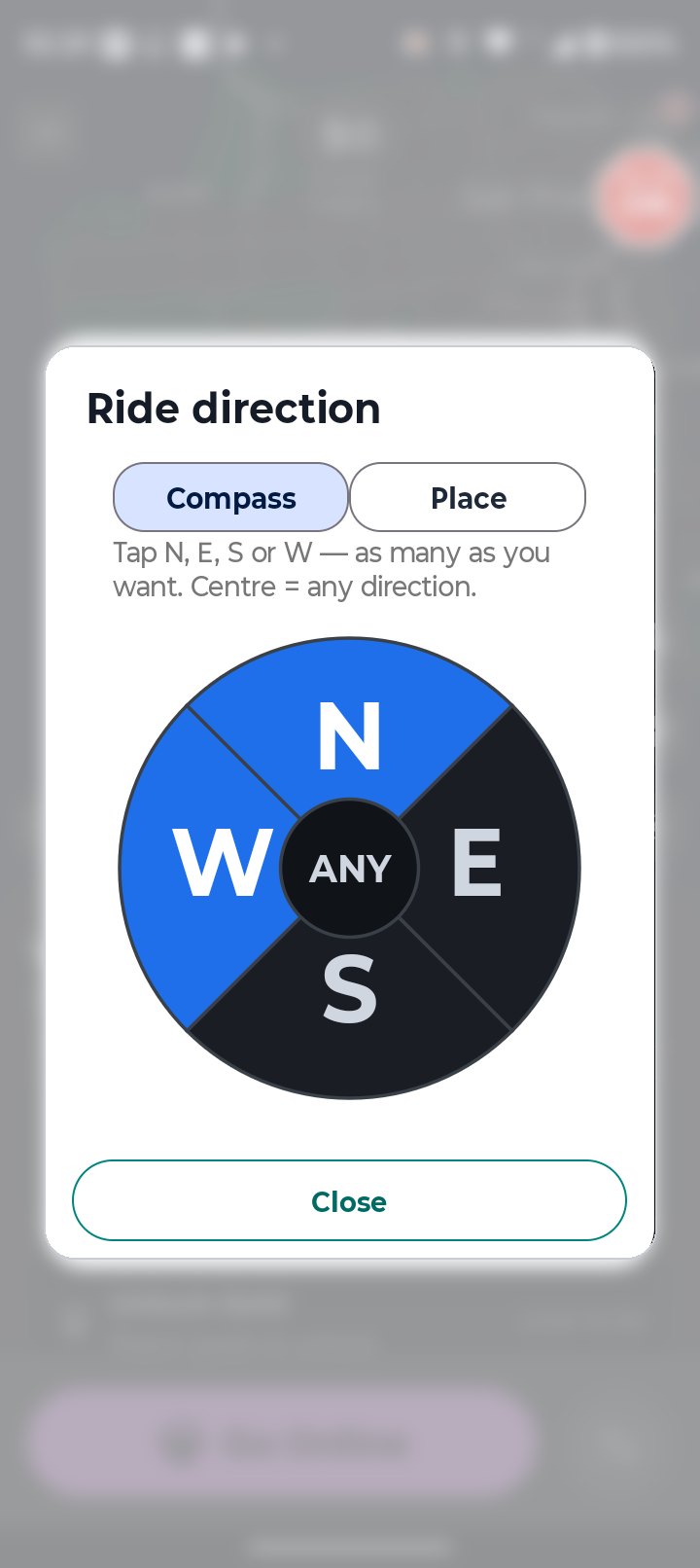
| Compass | The drop-off must be in a direction you picked. Two directions next to each other also take the one between them: N and W also takes NW. |
| Close drop-offs | A drop-off less than 0.5 mi away passes any direction. |
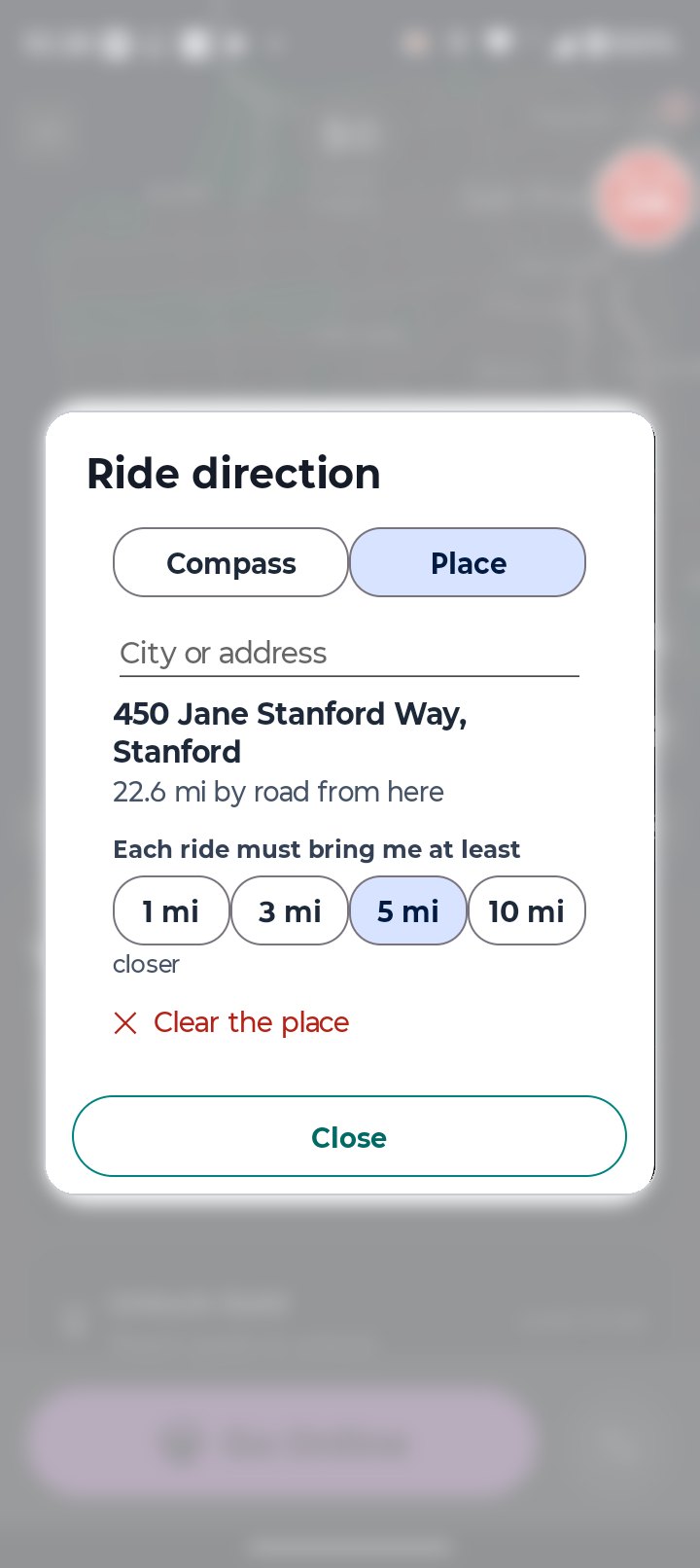
| Place | Type a city or an address and pick it in the list. It is kept as street and city (“450 Jane Stanford Way, Stanford”), with how far it is by road from where you are. |
| Each ride must bring me at least | 1, 3, 5 or 10 mi closer by road to the place. A ride offer that does not is turned down, and the banner says how much closer it would have brought you. |
| In the menu | The place shows under Ride direction…, on its own line: “→ 450 Jane Stanford Way, Stanford”. |
| Clear the place | Back to the compass. The place also stops by itself once you are within 2 mi of it. |
12 · Recording
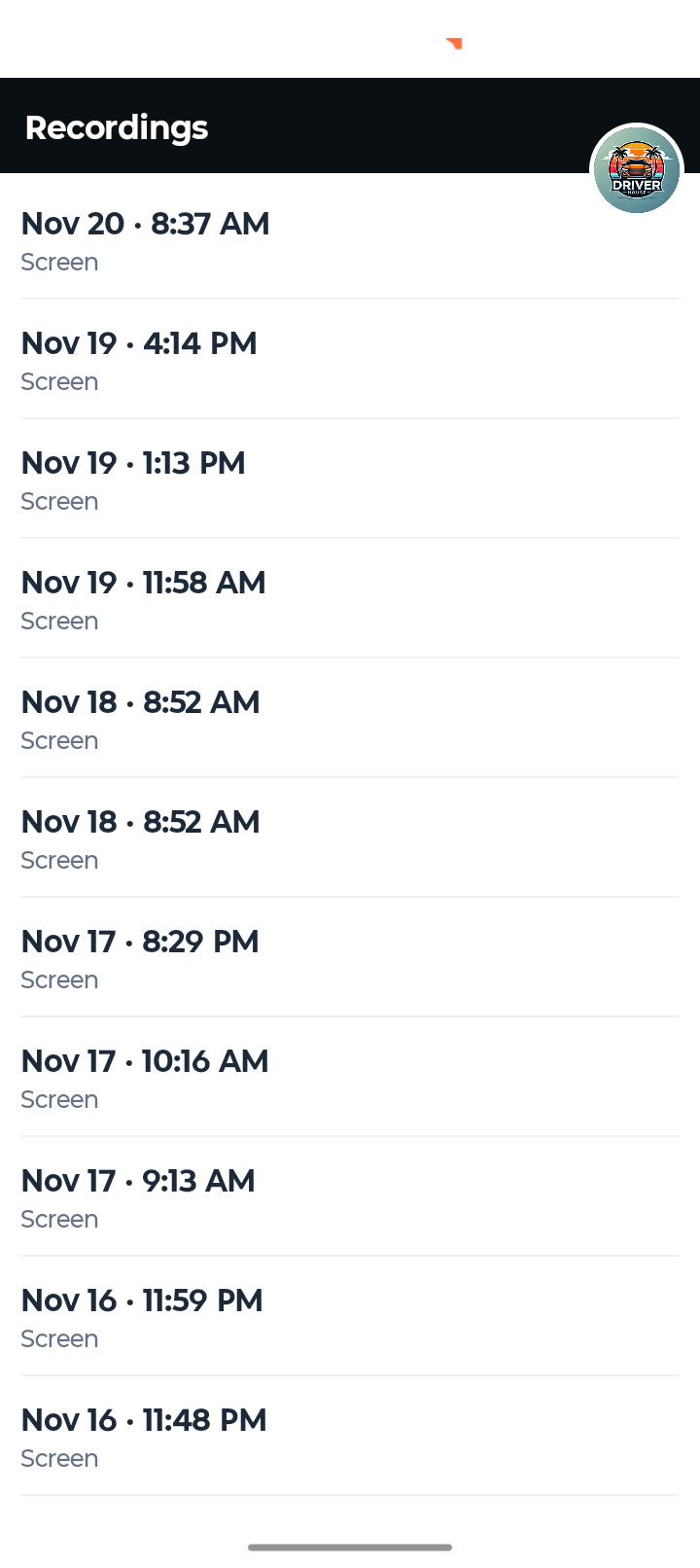
REC records the Screen, the Road (back camera) or the Cabin (front camera). SHOT takes one picture. Screen recordings are listed under Recordings…; Road and Cabin recordings go to your Gallery (4Real folder). Nothing is uploaded.
Learn more
Road and Cabin need the Camera and microphone permission (optional in Setup). Check your local rules before recording passengers.
13 · 4Real settings (setup)
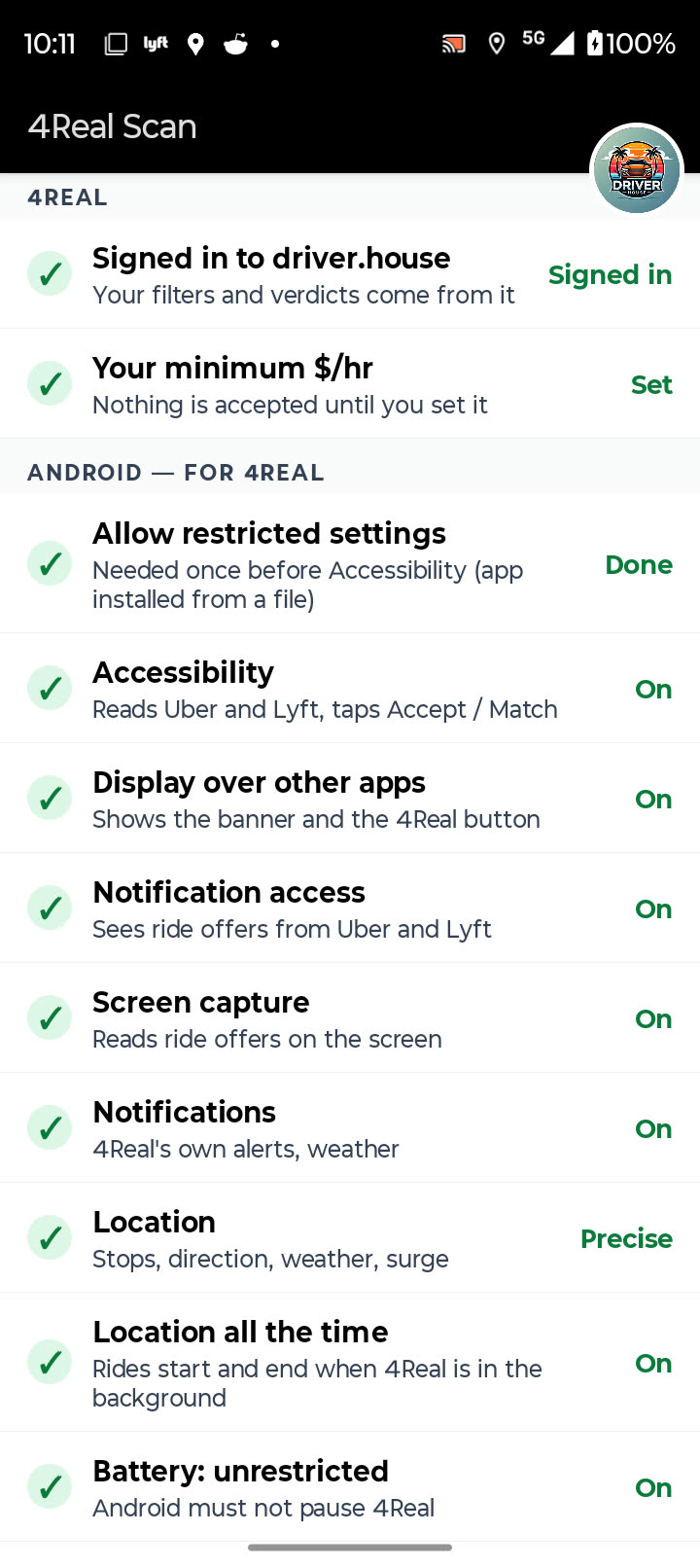
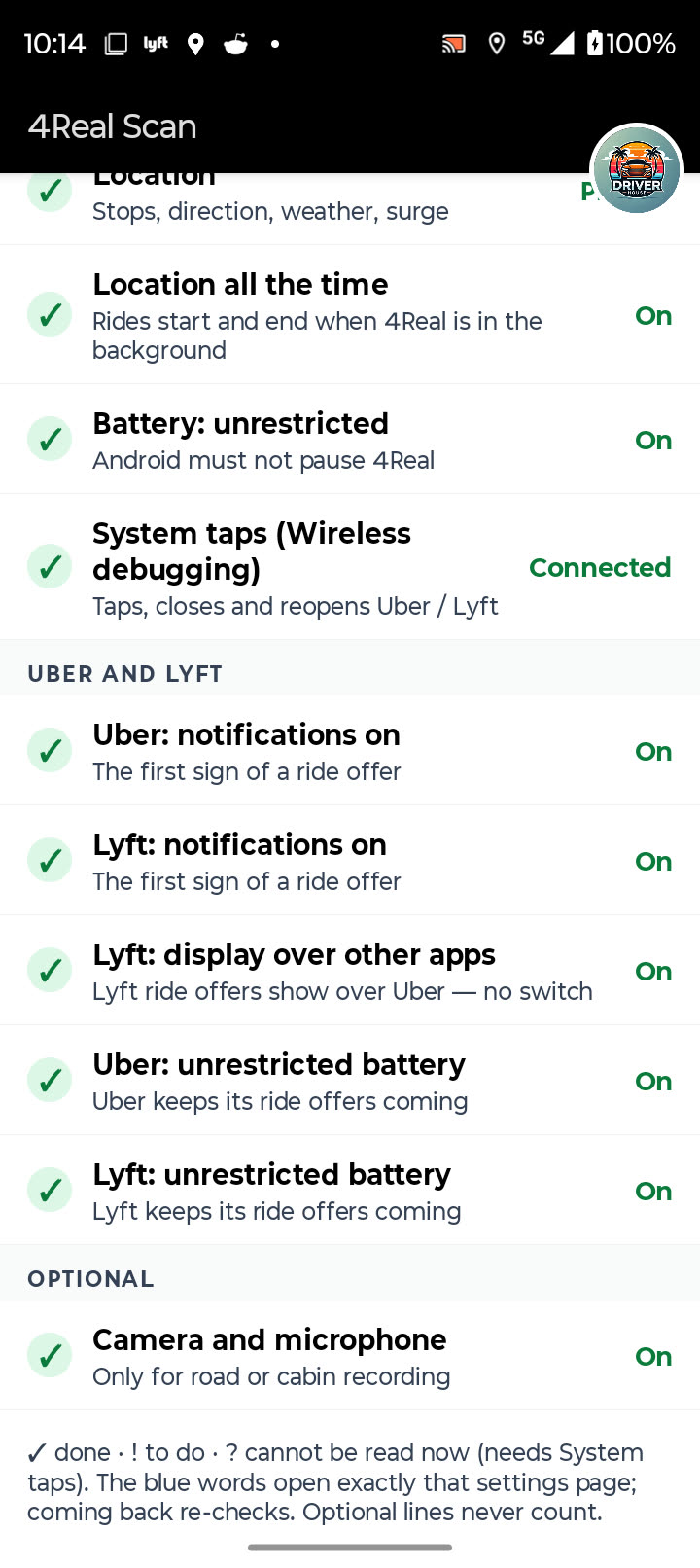
A checklist of what Android must allow. A blue word opens exactly the right Android page; come back and it re-checks.
System taps (Wireless debugging)
This is what lets 4Real tap Accept, switch apps and keep apps online. Banners work without it.
Learn more — Wi-Fi and phone restarts
- Set up once: Developer options → Wireless debugging → "Pair device with pairing code". 4Real reads the code itself — no computer needed.
- After each phone restart, the phone needs Wi-Fi for a few seconds to switch taps back on. Any Wi-Fi works (home, café). Your phone's own hotspot does not count.
- After that, taps keep working on mobile data. You never need to stay on Wi-Fi.
14 · Standard and Pro
| Standard | Pro | |
|---|---|---|
| Banners, all filters, Auto accept, switching, History, recording | ✓ | ✓ |
| Flooded roads on the ride's route in the Bay Area, from official reports (511 · CHP: highways and freeways) | ✓ | ✓ |
| Weather alerts (US) | ✓ | ✓ |
| PRO Flooded roads on the route anywhere in the US, city streets included | — | ✓ |
| PRO Every pickup and drop-off address looked up precisely (Standard: airports and places 4Real already knows) | — | ✓ |
| PRO A second route checked when a flood is near (the way traffic would send you) | — | ✓ |
Anything Pro shows a PRO tag in the app. On Standard it is shown grey, so you know it exists.
15 · Questions
4Real accepted nothing today — why?
Check the Accept chip: OFF (red) or PRACTICE (orange) never accept. Also check Setup → System taps is connected, and that your filters are not stricter than the ride offers around you.
A banner said CHECK — what do I do?
Read the reason line. 4Real could not check one of your filters for this ride offer, so it leaves the choice to you. Accept it in Uber or Lyft if you want it.
"System taps are OFF" — do I need Wi-Fi?
Only after a phone restart, for a few seconds, on any Wi-Fi. 4Real switches taps back on by itself. You do not need to stay on Wi-Fi.
How do I stop 4Real from tapping right now?
Tap the 4Real button 3 times quickly: KILL SWITCH ON. 3 taps again to turn it back on.
Does 4Real choose my pay?
No. Only your own minimum $/hr refuses a ride offer for pay.
Copyright URLYUP LLC © 2026 · Driver House · driver.house